Communication

Tinder is Allowing Users to Send Bitmoji in Messages

Communication
  • Monday, July 30 2018 @ 08:28 am
  • Contributed by:
  • Views: 2,080
Tinder adds the use of Bitmoji's to messages.

Tinder has announced that users will be able to add Bitmoji when messaging matches.

The popular dating app is utilizing the personalized-avatar service Bitmoji to help users be a little more creative and expressive when they communicate and share with their matches. Previously, Tinder did not allow users to send any images in messages to other matches because of potential abuse and sensitive content (a.k.a. “dick pics”). Users had to rely on curated photos (up to nine total per profile) to express their personalities and preferences, which many people felt was insufficient for something as personal as online dating.

Adding Bitmoji cartoons and caricatures allows users to be creative and express themselves to matches without worrying about the potential problems of sharing photos.
Tinder is Rolling Out Its New Profile Feature: Looping GIFs

Communication
  • Tuesday, July 17 2018 @ 07:23 am
  • Contributed by:
  • Views: 1,409

Dating app Tinder announced the rollout of a new feature called Tinder Loops, which allows users to create looping GIFs for their profiles.

Tinder users can upload short videos (two seconds in length) to their profiles so they can “show more personality” than with photos alone, according to Tinder. When the company tested the feature earlier this year in Japan, Tech Crunch noted that people who added the Loops feature to their profiles were 10% more likely to receive a right swipe.

The feature also seems to increase the likelihood that people will communicate over the app. Tech Crunch also reported that users testing the feature saw their average conversation length increase by 20%.

Match Group Launches Crown, a New Game-Like Dating App

Communication
  • Tuesday, July 03 2018 @ 08:18 am
  • Contributed by:
  • Views: 3,499
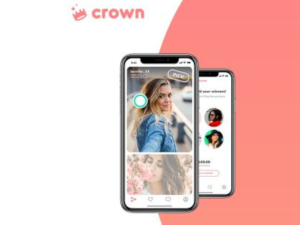
Crown

Match Group, the parent company of popular dating app Tinder, has launched a new app called Crown which offers a game-like format for online dating.

It works like this: every day at noon, users are presented with sixteen total profiles, shown two at a time, and must choose only one “winner” from each group of two. Users go through a process of elimination, until you end up with the final four matches, at which point you choose one final winner to be “crowned.” That winner is then alerted he/she has won, but that doesn’t mean you start chatting right away - it’s up to the winner to choose whether or not he/she wants to message you.

The game element is an interesting choice by Match Group. By turning it into a process where there is a possibility to “win,” the idea is that more users would feel invested in the process, and therefore be more likely to reach out. On the other hand, some argue, users might feel more acute rejection if their “winners” choose not to interact.

Badoo Dropping Its Swiping Feature for Live Video

Communication
  • Tuesday, June 19 2018 @ 09:52 am
  • Contributed by:
  • Views: 2,187
Badoo Live

Dating app Badoo, which boasts a record 388 million users, has announced that it will be dropping the swiping feature from its dating app. The company plans to replace swiping with a new feature called Badoo Live which features live video.

According to TechCrunch, Badoo received feedback from users that they were getting tired of swiping, and were looking for a “more authentic” way to online date. The company wanted users to be able to get a better glimpse of potential matches before making decisions to meet, and thought the best way to do this would be through video.

Badoo Live will be similar to Facebook Live, in that users will be able to message their matches while recording their own live video, offering instant interaction to build connection. People can also watch video in playback mode, also similar to Facebook Live. Badoo will also offer a “Badoo Live” tab that users can click on to see any live videos happening that moment.

Dating App Her Launches Community Feature to Engage Users

Communication
  • Monday, June 11 2018 @ 10:29 am
  • Contributed by:
  • Views: 937
Her Dating App Feeds

Dating app Her (orginally called Dattch), designed exclusively by and for queer women, is expanding its focus to bring women together in conversation as well as for dating. Its new Community feature provides a forum for users to get updates on news and exchange ideas, expanding the app’s purpose beyond forging romantic ties.

Launched in time for Pride month in June, Her’s new feature allows for users to connect with each other around certain topics of interest to the community. In other words, a place to gather around the watercooler, but online. According to website TechCrunch, the first set of community groups includes a space for queer women of color, one centered around mindfulness and wellbeing and another for news and entertainment. App creators plan to launch more groups in the future, including pop-up forums around specific events, or even user-generated communities.

Users would be able to follow a person’s feed or post messages to a community board.

Is Video The Next Big Thing In Online Dating?

Communication
  • Thursday, May 31 2018 @ 11:23 am
  • Contributed by:
  • Views: 723

Before online dating there was video dating, and as the viral clip below proves, it could be just as awkward and cringe-worthy as any Tinder swipe session.

Take one look at a montage of hapless suitors dressed in their retro best talking about being “an executive by day and a wild man by night” and their career in toxic waste management, and it’s easy to see why video dating fell out of fashion. So out of fashion, in fact, that while video has exploded across almost all major social media platforms, it has yet to make a triumphant return to the dating mainstream.

Startups have tried for decades to update video dating for modern singles with little success, but thanks to new features from some of the industry’s most reputable names, the tide could finally be poised to turn.

Page navigation